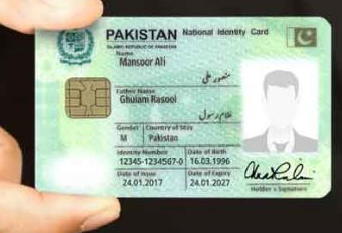
The Computerized National Identity Card (CNIC) is the lifeline of a Pakistani citizen. It is more than just a piece of plastic; it is the primary document required for everything from opening a bank account and getting a SIM card to casting a vote and buying property. Given its importance, there are many instances where you might need to verify your CNIC details, check the status of an application, or even access a digital version of your ID card.
In the past, verifying identity details meant long queues at NADRA centers. Fortunately, digitization has changed the landscape. You can now access various services from the comfort of your home using your smartphone or computer. However, there is often confusion regarding what you can and cannot do online. Many people search for ways to simply download a scanned image of their card or check a photo using just a number, but strict privacy laws and security protocols govern these actions.
This guide will walk you through the official, secure methods to check your ID card details with a picture online. We will cover how to use the specific NADRA applications designed for this purpose, how to use SMS services for quick checks, and the correct procedure for acquiring a digital ID or a physical replacement.
ID Card Details With Picture Online Check
The most common question citizens have is whether they can view their ID card details, specifically their photo, through an online portal. The short answer is yes, but it requires specific official tools. You cannot simply enter a CNIC number into a web browser and expect a full profile with a photograph to pop up. This would be a massive security breach.
Instead, the National Database and Registration Authority (NADRA) has introduced the Pak Identity App. This application is the gateway to viewing your “Digital ID.” While you cannot download a loose image file of your physical card to your gallery, the app allows you to store a secure, verifiable digital ID after you complete biometric verification. This digital ID serves as a valid proof of identity for many services and confirms that the photo and details on record match the person holding the phone.
Check ID Card Details With Photo Online Free
It is important to manage expectations regarding costs. While downloading the Pak Identity App is free, certain verification services or applications for new cards usually carry a fee. Be wary of third-party websites claiming to offer “free photo checks” of any CNIC number. These sites are often scams designed to harvest personal data. The only secure way to view the photo associated with a CNIC record is through official NADRA channels where you verify your own identity first.
Get Your Digital ID (Official & Secure)
If you need a version of your CNIC on your phone, the Pak Identity App is your solution. This does not give you a PDF copy of the plastic card but provides a secure digital identity stored within the app’s vault.
Step 1: Download the App
To begin, you must download the Pak identity Mobile App. Ensure you are downloading the official app published by NADRA to guarantee the security of your biometric data.
Step 2: Register Your Account
After installation, create an account. The registration process requires:
- Your valid CNIC number.
- A working email address.
- An active mobile phone number.
You will receive verification codes (OTPs) on your email and phone number to activate the account. This two-factor authentication ensures that only you can create an account linked to your identity.
Step 3: Biometric Verification
This is the most crucial step for security. The app will ask you to verify your identity using the camera on your smartphone. You will need to:
- Scan your face: The app uses facial recognition technology to match your live face with the photo NADRA has in their database.
- Scan your fingerprints: You will use the phone’s camera to scan your fingertips. This ensures high-level security and prevents identity theft.
Step 4: Access Your Digital ID
Once the biometric verification is successful, your Digital ID is generated. This ID is stored in the app and displays your photo, name, and other key details. You can use this for secure access to services that accept digital identification.
Check ID Card by CNIC Number
If you do not need a picture and only require basic information or verification of a CNIC number, you do not always need the app. For simpler queries, the SMS service is a quick and effective tool.
Using the 8300 SMS Service
The 8300 service is widely used, especially during election periods, to verify voter registration, but it can also confirm the validity of a CNIC.
- Open the messaging app on your mobile phone.
- Type your 13-digit CNIC number (without dashes).
- Send this message to 8300.
You will receive a reply containing the basic details associated with that CNIC number, such as the name and the electoral area. This is a fast way to check if a CNIC number is valid and active in the database. Note that standard SMS charges usually apply to this service.
ID Card Number Check Online
When we talk about an “ID card number check online,” we are often referring to verifying the status of a card or an application. If you have recently applied for a new card, a renewal, or a modification, you don’t have to wait in the dark.
The Pak Identity Portal is NADRA’s comprehensive web-based interface. By logging into the portal, you can track the status of your existing applications. If you have applied for a reprint or a renewal, the portal will tell you if the card is in printing, dispatch, or ready for collection.
Additionally, this portal is used for the verification of family members (Family Registration Certificate or FRC). By inputting your CNIC, you can view details of family members linked to your record, ensuring that your family tree is updated and correct.
Apply for a Duplicate CNIC (Physical Card)
Sometimes a digital check isn’t enough. If your card is lost, damaged, or expired, you need a physical replacement. You do not always have to visit a NADRA center for this; the online system is robust enough to handle the entire application.
Modification, Renewal, and Reprint
NADRA’s online identity issuance service provides an end-to-end solution for:
- Modification of CNIC: If you need to change your address or marital status.
- Renewal of CNIC: If your card has expired.
- Reprint / Lost CNIC: If you have lost your card or it is too damaged to use.
The Application Process
- Visit the Pak Identity Portal: You can access this via a web browser or use the Pak ID app for specific services.
- Select Your Category: Choose “Reprint” if lost, or “Renewal” if expired.
- Provide Information: You may need to upload documents depending on the nature of the application (e.g., a marriage certificate for a name change).
- Pay Fees: The fee structure varies based on the delivery speed (Normal, Urgent, Executive) and the type of card (Smart NIC vs. NICOP).
- Submission: Once submitted, the card is processed and delivered directly to your home address.
Check ID Card Details With Photo Online Pakistan: Privacy Concerns
It is vital to address the privacy aspect of checking ID card pictures online in Pakistan. NADRA maintains a centralized, secure database. Unlike social media, this data is not public property.
Consequently, there is no legal “public directory” where you can type in a random CNIC number and see the person’s photo. This restriction is in place to protect citizens from fraud and harassment. Services that claim to bypass this are operating illegally and should be avoided.
However, authorized verifications are different. For example, banks and telecom operators use biometric verification devices linked to NADRA to verify your photo and ID when you open an account or buy a SIM. For personal use, the Pak Identity App remains the only authorized medium to view your own digital ID with a photo.
Securing Your Identity
As we move toward a more digital Pakistan, the ability to check ID card details with a picture online adds a layer of convenience to our lives. Whether you are using the Pak ID app to secure a digital identity, sending an SMS to 8300 for a quick check, or using the web portal to order a replacement card, the power is now in your hands.
Remember that your CNIC is a sensitive document. Always use official NADRA channels the Pak Identity App or the official website for any verification or application. Avoid sharing your CNIC number on unauthorized third-party sites to ensure your digital and physical identity remains secure.